

Before you begin
- Import your video and choose the duration and frame you want first.
- Prepare the short title or message you want to add.
- Find a place where the text will remain readable without hiding the main subject.
Step by step
Prepare the frame
Choose the retained video sections and final frame before placing text. A later crop can exclude text near an edge.
Enter the text
Open the text tool with active Plus or a valid trial. Type the title or message yourself and keep it short enough to read during playback.
Choose color and position
Select a preset swatch or open Custom color and confirm your choice. Adjust the text position in the preview, then tap Apply. Check contrast against both light and dark moments of the background.
Check the finished video
Play the result to check spelling, color and position. Save the project if needed, then export and inspect the actual file before sharing.
Check the result
Keep the important picture visible
Avoid covering faces, hands, product details or existing essential labels. For vertical clips, leave some room near the edges where a receiving app may place its own controls.
Read it at phone size
A title that looks good while zoomed in can be too small in a post. Preview the video at a realistic size and shorten or reposition the text if necessary.
Checked on an Android phone
These screenshots show the saved trim, framing, text, mask and mute settings reopened in each interface language. No changes were applied again while taking the screenshots.
One actual MP4 export from the same project is shared across all 12 language pages. We checked its 9-second duration, portrait display, lack of an audio track, manual FOREST text and fixed black mask.
- 9 seconds, 9:16 portrait, 1080 × 1920 display, no audio track.
- FOREST is manually entered static text, rather than automatically generated subtitles.
- The solid-black mask stays in a fixed area; it does not follow moving subjects.
- One export from one Android phone is shared across 12 language pages; these are not 12 separate exports.
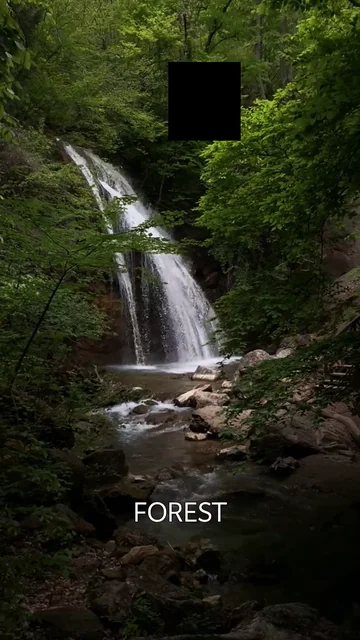
What we checked · Android · 0.1.3 (11)
Source video: Waterfall in Forest by VeraSilkina on Pexels.
- These checks cover one Android phone and one video. Other devices, formats and iOS were not tested here.
- The saved settings are an example, not a preset automatically used for every video.
- This example does not verify mosaic, automatic subtitles, subject tracking or publishing in other apps.
What to know
- This is a manual text overlay workflow. It does not promise automatic transcription, subtitle translation or speech recognition.
- The receiving app may add controls or crop a preview. Review the final post composition in that app before publishing.
Questions and answers
Can I add a title to a local video?
Yes. Import it from the gallery or files and use the text tool with Plus access or an active trial.
Does adding text generate subtitles automatically?
No. This guide covers text you enter yourself. It does not describe automatic subtitles or translated captions.
Should I crop before adding text?
Usually, yes. Decide on the final frame first so you can place the text within the area that will be kept.