

Before you begin
- Import the video you want to share and confirm you may reuse it.
- Install and sign in to the destination app where needed.
- Check that the video duration and frame suit the destination's current requirements.
Step by step
Choose the source clip
Import a local video from the gallery or files, or download one from a supported public link. Preview it so you can confirm the content before preparing a repost.
Edit only what you need
Trim unwanted opening or ending footage, or mute the source audio if appropriate. If you make changes, export the edited result before sharing that version.
Choose a sharing destination
Open distribution and choose the destination you want to use. Manage configured destinations from the platform screen; available receiving apps depend on your phone.
Finish in the receiving app
Check the receiving account, caption and audience. Follow that app's remaining steps and verify the post there if you decide to publish it.
Check the result
Check preparation and the video version
Use the latest completed export after editing, or the unchanged original. Preparation may reuse a ready video, but final file verification still runs; wait for its real result before handing off.
Read history before retrying
Distribution history separates Handed off, Cancelled and unconfirmed results for each destination. If status is uncertain, check the receiving app before retrying to avoid repeating a handoff.
Checked on an Android phone
This example imports an authorized local 9:16 waterfall video, edits it and produces one actual export. It verifies local import and export, rather than a public-link download or receipt and publication in another app.
One actual MP4 export from the same project is shared across all 12 language pages. We checked its 9-second duration, portrait display, lack of an audio track, manual FOREST text and fixed black mask.
- 9 seconds, 9:16 portrait, 1080 × 1920 display, no audio track.
- FOREST is manually entered static text, rather than automatically generated subtitles.
- The solid-black mask stays in a fixed area; it does not follow moving subjects.
- One export from one Android phone is shared across 12 language pages; these are not 12 separate exports.
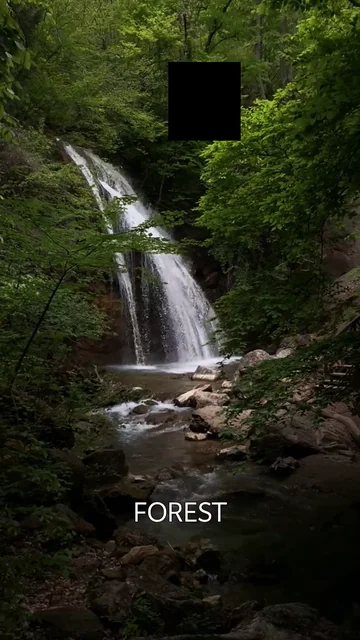
What we checked · Android · 0.1.3 (11)
Source video: Waterfall in Forest by VeraSilkina on Pexels.
- These checks cover one Android phone and one video. Other devices, formats and iOS were not tested here.
- The saved settings are an example, not a preset automatically used for every video.
- This example does not verify mosaic, automatic subtitles, subject tracking or publishing in other apps.
What to know
- BeTheClip does not automatically publish to every selected account or batch-post to multiple services.
- The destination app controls sign-in, upload processing and publication. Destination support and file requirements can change.
Questions and answers
Can I share without editing?
Yes. Share an available unchanged original directly; export first when you want to share your edits.
Does Handed off mean the video was published?
No. It records the file handover. Cancelled means an explicit cancellation; an unconfirmed result needs checking in the receiving app. Complete and verify publication there yourself.
Does Free support sharing?
Yes. Free includes system sharing and one configured destination. Plus or a valid trial removes the configured-destination count limit, but receiving apps still control upload and publication.