

Before you begin
- Use footage you own or are allowed to edit and reuse.
- Check whether the area stays in the same position throughout the clip.
- Choose between losing some frame area with a crop and obscuring a selected region with a cover or mosaic.
Step by step
Inspect the complete clip
Check whether the target remains fixed throughout the video. A stationary mask cannot follow a moving watermark or subject.
Choose crop or fixed mask
Crop an edge only if the remaining composition works. Otherwise choose a fixed cover or mosaic and wait for preparation to finish; repeated Add taps do not speed it up.
Position and confirm the edit
Adjust the selected region and tap Apply. Wait for preview confirmation and the success feedback. If preparation or preview fails, read the error and retry when available, or cancel to restore the project.
Review and export
Play the whole clip and inspect the region and its edges. Export the edited video and check the actual result before sharing.
Check the result
Read the operation feedback
Loading is not success. Wait for confirmation before continuing; a failure needs a retry or cancellation rather than another mask added blindly.
Source thumbnails may be reused
Completed source thumbnails can be reused after editing, reducing repeated source scanning. Preparation time still depends on the video and device; no fixed speed improvement is promised.
Checked on an Android phone
These screenshots show the saved trim, framing, text, mask and mute settings reopened in each interface language. No changes were applied again while taking the screenshots.
One actual MP4 export from the same project is shared across all 12 language pages. We checked its 9-second duration, portrait display, lack of an audio track, manual FOREST text and fixed black mask.
- 9 seconds, 9:16 portrait, 1080 × 1920 display, no audio track.
- FOREST is manually entered static text, rather than automatically generated subtitles.
- The solid-black mask stays in a fixed area; it does not follow moving subjects.
- One export from one Android phone is shared across 12 language pages; these are not 12 separate exports.
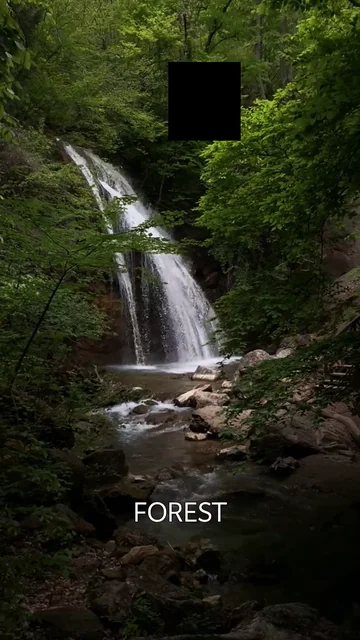
What we checked · Android · 0.1.3 (11)
Source video: Waterfall in Forest by VeraSilkina on Pexels.
- These checks cover one Android phone and one video. Other devices, formats and iOS were not tested here.
- The saved settings are an example, not a preset automatically used for every video.
- This example does not verify mosaic, automatic subtitles, subject tracking or publishing in other apps.
What to know
- Cover and mosaic obscure pixels; cropping excludes pixels. None of these tools restores the original hidden picture.
- The workflow does not promise invisible watermark removal, AI reconstruction, object tracking or removal of every watermark.
Questions and answers
Does this remove a watermark without a trace?
No. A crop removes part of the frame, while a cover or mosaic leaves a visible edited area. The hidden picture is not reconstructed.
Which option should I use for a corner watermark?
Consider a crop if you can exclude the corner and still keep a useful composition. Otherwise, a cover or mosaic can obscure that fixed region with a visible result.
Can a mosaic follow a moving watermark?
Do not assume that. This workflow uses a manually selected fixed area, so you must review the entire video for movement outside it.